“It’s too time consuming to log my food.”
Yes – we know! It’s a lot of work, especially at the beginning of your Cronometer journey. We get this one all the time from users and while we think that the time spent logging your food is well worth the knowledge you gain from it, we do have a few tricks up our sleeve which will help you speed up the process.
Home Screen Quick Add
If you’re using the mobile app, it’s easy to reduce the amount of taps it takes to add a food. From the home screen of your phone, long-tap on the Cronometer icon which will bring up a quick actions menu. Tap Add Food, and you’ll get brought directly to the food search panel.

Barcode Scanner
A fan-favourite Cronometer feature is our Barcode Scanner. Don’t worry, it’s free! Simply scan the barcode of the food you’ve eaten and it will bring up the entry of that food in our database.
If the food isn’t already in our database, we’ll ask you to take a photo of the nutrition label and the packaging and the app will auto-fill the nutrition details and create a Custom Food in your account. This allows you to add the food to your Diary right away but it will also submit the item into our queue to be checked by a staff member before being added to the public database.
Access the Barcode Scanner (only available on the mobile app) in a few different ways:
- Tap the + button on the main menu, select ‘Scan Food’.
- Use the home screen quick actions menu mentioned above.
- From the food search panel, tap the barcode icon in the top right corner.
Learn how to use the Barcode Scanner on Cronometer by checking out our Cronometer University video here!

Copy & Paste
Copy & paste is a functionality you can use in several ways across the app to save time while logging your food. Copy a single entry by swiping right on the food and tapping the ⋮ icon. Copy an entire day by tapping the ⋮ in the top right hand corner of your Diary. Gold users can also copy the contents of an entire Diary Group by swiping right on the Diary Group header.
Get a full breakdown of the many ways to use copy & paste on mobile or on web.

Custom Meals
If you’re not already using our Custom Meal feature, now is the time to start! Meals allow you to group several foods together so you can quickly add multiple foods in just a few taps.
If you’re always eating the same thing for breakfast (two eggs, toast and three coffees) or taking the same supplement cocktail every day, create a meal containing those items. That way, you’ll just need to add the Custom Meal to your Diary instead of each individual item.
Once a Custom Meal has been added to your Diary, you can use the ‘explode meal’ feature to create individual entries for each food so you can edit the measurements or delete items separately.
Check out our Custom Meal blog here to learn more!
NEW feature!
Photo Logging (Gold Feature)
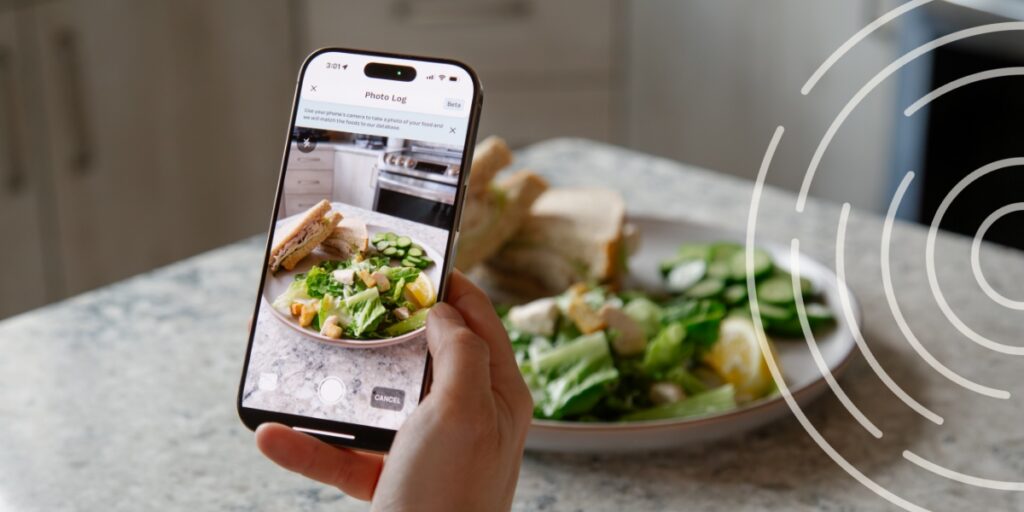
When you upgrade to Cronometer Gold, you’ll gain access to our Photo Logging feature, which allows you to upload a photo of your meal and we’ll automatically identify the ingredients.
This feature is a total game-changer when it comes to logging your food fast because you skip the process of typing and searching for each ingredient separately. We even estimate the portion sizes and give you an easy way to edit and swap out ingredients.
Set Repeat Items (Gold Feature)
By upgrading to Gold, you’ll get access to several features that will make tracking your nutrition faster and easier – you’ll no longer be interrupted by advertising, you can create recipes in a flash with our Recipe Importer and you’ll gain access to be able to schedule your foods, meals and recipes on repeat.
This feature cuts down a ton of time if you consistently consume the same foods since you can add all of your repeating items in just one click.
Check out our Cronometer University on how to set up Repeat Items here.
Multi-Add
If you’re adding multiple foods at once, you can save a little time by using the ‘Multi-Add’ functionality. When searching for a food on the mobile app, tap on the orange filter icon in the right hand side of the search bar. Toggle on ‘Enable Multi-Add’ and start your food search. Tap on the orange box to select an item and search for your next foods. You’ll be able to review before adding all of the items to your Diary or creating a Custom Recipe with your selection.

Quick Add From Diary Group (Gold Feature)
By upgrading to Gold, you’ll also gain access to Diary Groups which allow you to categorize your food entries. Most of our users will use breakfast, lunch and dinner but we applaud any creativity here.
Diary Groups also come with some little-known functionality including the quick add menu. On mobile, tap the + on the left side of the Diary Group label, which will bring up a menu allowing you to add food, exercise, a biometric, note or scan a barcode.
You can even customize the menu for each Diary Group in More > Diary Settings > Group Quick Add Preferences.

Voice Logging (Gold Feature)
When you upgrade to Cronometer Gold, you’ll gain access to Voice Logging, which allows you to describe your meal in your own words and have it turned into a food entries automatically.
This feature is a game-changer when it comes to logging food quickly because you can skip much of the typing, searching, and selecting process. Simply say what you ate, review the matched foods, make any edits if needed, and add it to your diary in moments. Visit our blog here to learn more.

Quick Add From Custom Foods & Recipes Page
On mobile, if you find yourself on your Custom Foods or Custom Recipes page (Foods > Custom Foods or Foods > Custom Recipes), swipe right on any item in the list to bring up an option to add that item to your Diary.

Well, there you have it. We hope that you learned at least one thing from these quick-adding tips. Put them into practice to help make logging your food in Cronometer an easier, breezier process.
Want to learn more Crono hacks? Here are some more tips & tricks.